1. Once the voucher is in your company account, you can then assign your voucher to the employee or club member who will be attending the programme. Please note, before you can add employees or club members to the company account, they need to have a personal account on instituteofswimming.org
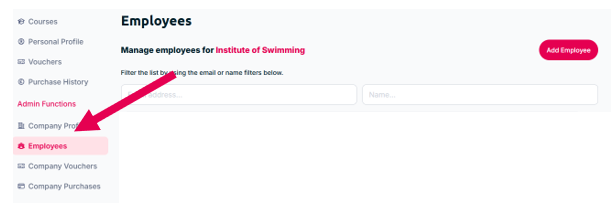
2. Once your employee has created their own account, go to the ‘Employees’ section of the company account:
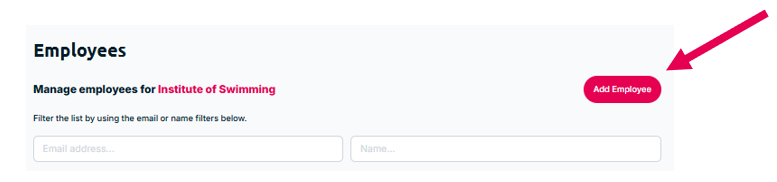
3. Click on 'Add Employee':
4. Type in your employee’s email address that is linked to their account on instituteofswimming.org:
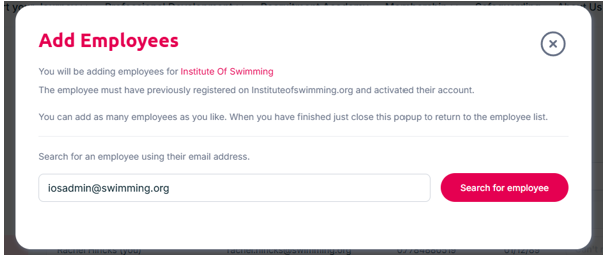
5. This will bring up your employee’s name and DOB to ensure that you have selected the correct person. If this is correct, please select ‘Add as employee'. If the employees name does not appear after inputting their email address, they do not yet have a personal account.
6. Once you have added the employee or club member to your Company Account go back to the vouchers section and click the 'Assign' button and search for your employee using their email address or name:
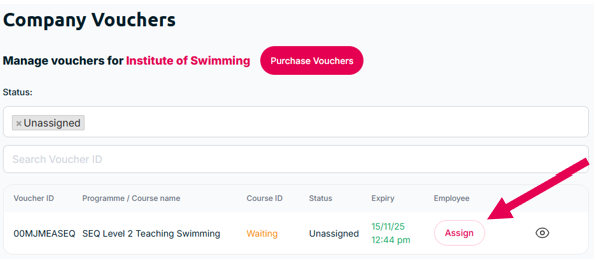
7. Once the voucher is assigned, the employee or club member will be emailed inviting them to book onto the training programme.
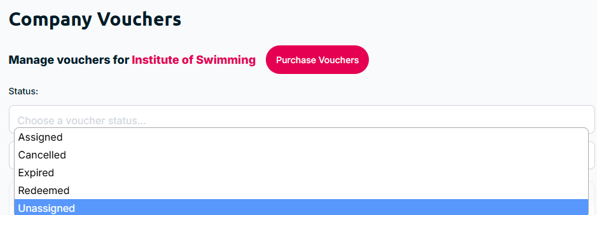
You can view the status of the voucher by changing your filters:
Was this article helpful?
That’s Great!
Thank you for your feedback
Sorry! We couldn't be helpful
Thank you for your feedback
Feedback sent
We appreciate your effort and will try to fix the article